



Creating and setting up a professional-looking website doesn’t have to be as daunting as it sounds, nor does it require emptying your savings account (because lord knows sometimes it can feel like that’s what it’s going to take! 😩).
Today, I’m walking you through the surprisingly simple steps of setting up a Showit website that screams “high-end” and “professional” without the need for any design or technical wizardry on your part. Let’s dive in!
1. Choose Your Perfect Website Template
The secret to getting that high-end look without the high-end price tag? A website template! Website templates allow you to get all the structure and finesse of a beautiful website that’s already made, and then just customize it with your own branding and images so that it looks like it was made for you! Seriously, a nicely customized website template looks just as good (and sometimes even better!) than a custom one.
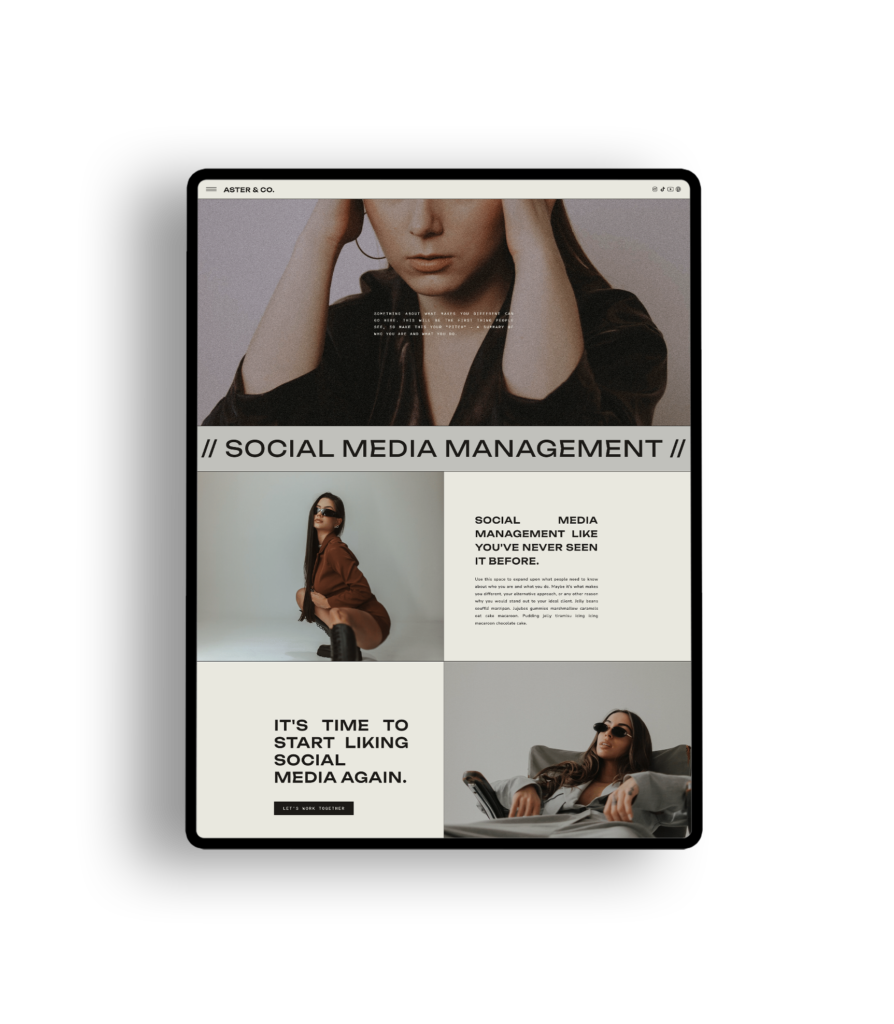
So first things first: how do you go about selecting the right website template? You want something that feels “you” but also stands out and speaks quality. Our Template Shoppe is filled with designs specifically crafted for coaches, photographers, and online service providers. Take your time browsing through our collection and envisioning your brand taking shape in each template. Want that clean, minimal look? The Yarrow is your girl. Or maybe bold and modern is your thing? The Aster is the one for you. Remember, your website is your digital storefront – your literal online home – and it should reflect your personality and give your visitors an interactive experience of your brand.


2. Gather Your Content
Before you dive into customization, gather all the content you’ll need. This will be your brand photos , your logos, your typography and your color palette.
What you’ll need:
- Brand photos (see tip below!)
- Logos (you’ll most likely just need the PNG files – the ones with the transparent background)
- Typography (know what font is used for what (main titles, paragraph font, etc) and if they’re custom fonts, have those font files on hand. To add them to Showit, you’ll need the .woff format of your font files. If you don’t have those, you can use this tool to convert your font files into .woff.
Having everything on hand makes the process smoother and faster.
HOT TIP 🔥
Try to get the best quality brand photos you can. A website is only as good as its images. The best option? Hire a brand photographer to do a brand shoot! This will give your brand instant authority and create something original to you. It’s so worth the investment and will make your brand look high-end more than anything else.
3. Customize Your Template
Now, the fun part! Showit’s drag-and-drop interface makes customization a breeze. Want to change a font or adjust a color? Just click on it to change it. No coding, no fuss, and no limitations on what you can/can’t do in terms of layout, changing individual elements, and desktop vs mobile versions (I’m looking at you, Squarespace). Every template in our shop comes with a video for each page to guide you through your customization if you get stuck, which makes the process so much easier and whew! stress free.
4. Mobile Optimization
It’s no secret that most people are using their phones to browse the internet, so you know your website needs to look good on mobile. And it’s not good enough for a desktop version to be auto-translated to a mobile format because let’s be honest, you can tell when a website’s done that. With Showit, you can say bye-bye to weird mobile sites that look clunky and don’t work well, because on Showit you have the power to customize your mobile site separately. That script font you have at the bottom of the paragraph on your About page? You can put it wherever you want on the mobile site, and it doesn’t affect how it’s viewed on desktop. You want the button to be blue on mobile and black on desktop? Easy! How cool is that?
5. SEO Optimization
An beautiful website won’t do much if it’s hidden from your dream clients. SEO might sound intimidating, but with Showit, you can set up your SEO foundation easily! Use descriptive titles, engaging meta descriptions, and sprinkle relevant keywords throughout your content. All our website templates are already set up for SEO with all the relevant text tags, which just means Google can read each page easily. Showit also allows easy integration with Google Analytics, so you can keep track of your site’s performance and make data-driven decisions.
6. Launch With Confidence
Once you’re happy with how everything looks and functions, it’s time to hit that “Publish” button! Share your new site with the world through your social media channels, email list, and any other platforms where your potential clients hang out. And throw yourself a party because hey – you did it! You’ve created and launched your website, which is a HUGE step for your business, and it only took you half the time it would making it from scratch (or less)! Take a moment to celebrate and start talking about it everywhere. Show it off – literally! Then, get ready to dive into the analytics to understand your audience better and tweak your site as needed. Remember, a website is never truly “done”; it evolves as your business grows.
Setting up your Showit website doesn’t have to be a solo journey. I’m here to guide you every step of the way, from choosing the perfect template to celebrating your launch. So, are you ready to create a website that not only looks incredible but also converts visitors into raving fans? Find the template that speaks to you and let’s get started!